More about Menus
Create or Append? Menu vs. MenuItem?
X-Plane does some manipulation behind the scenes to make menu handling easy, but as with most magic, you might get confused if you try to figure out what is actually happening. Add to that the fact that, technically, all Python plugins appear to X-Plane as a single plugin (called XPPython3) additional manipulation is required in order to present to you, the python plugin developer, a consistent workable interface.
Plugins Menu
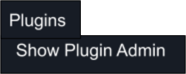
On start-up the “Plugins” menu contains a single item, “Show Plugin Admin”. This is added by Laminar and will display all loaded plugins. Note that because all python plugins are executed by XPPython3, only XPPython3 is listed. FPS impact for XPPython3 is the sum impact of all python plugins (XPPython3 by itself adds negligable overhead).
Top-Level Menu
Plugins can append to this “Plugins” Menu, under the “Show Plugin Admin” item. The order of added items is simply determined by the order of calls – by any plugin – to any of the following:
xp.createMenu(..., parentMenu=None, …)
xp.appendMenuItem(menuID=xp.findPluginsMenu())
xp.appendMenuItemWithCommand(menuID=xp.findPluginsMenu())
xp.appendSeparator(menuID=xp.findPluginsMenu())
We’ll call these “top-level” menu items – items directly placed under the “Plugins” menu.
If plugins intermix calls, the items will be intermixed: there is no way to guarantee all items by the same plugin are next to each other. There is no way to change the order of items.
For this reason, it is recommended that, if order is important, have a single top-level item for your plugin, and place your other menu items as sub-items. (That is, as items on a second-level menu.)
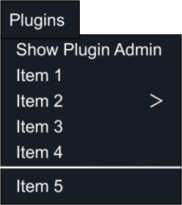
In the graphic to the right, we cannot tell if:
One plugin created 5 items and one separator; or
One plugin created Item 1 and item 2 and another plugin created Item3, Item 4, the separator and Item 5; or
One plugin created Item 1, a second plugin created Item 2, the first plugin then created Item 3, a third plugin created Item 4, then the first plugin added the separator and Item 5.
Do you care?
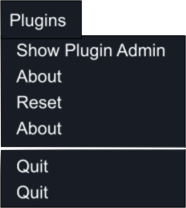
You might, if you created multiple top-level items, and don’t make it clear to the user. For example, assume you have two plugins and one creates three items: “About”, “Reset”, separator, and “Quit” and the second plugin creates “About” and “Quit”. You might end up with something like the image on the right.
Don’t do that.
Menu Item Index
Internally, as your plugin added items, there is an index associated with each. The index is relative to the items your plugin has added not relative to the full set of items on the top-level.
For example, if your plugin created three items and a separator, you’ll know that you have items with indices [0, 1, 2, 3]. A second plugin creating two items will have indices [0, 1].
Note that only xp.appendMenuItem() and xp.appendMenuItemWithCommand() return
the newly created index number. Calling xp.createMenu() with parentMenu=None
will add an item, but you’ll have to “know” which index it is, as the function returns a
menuID, not an index.
Similarly, calling xp.appendSeparator() with menuID=None will increment the
index. Laminar documentation (and header file) indicates
appendSeparator() does not return anything, but actually
it does… and so do we.
You’ll need the index value if you want to delete
the item. For example, if the separator is your
plugin’s third addition (that is, index #2), then
to remove the separator, call
xp.removeMenuItem(menuID=findPluginsMenu(), index=2).
One more thing about menu item index: When you remove a menu item using xp.removeMenuItem(),
each of the other menu items for the same menu has its menu index updated to remove any numbering gap.
If the menu item you’re removing is the last item (numerically), then all the other indices will remain the same. If
you’re removing another menu item, the subsequent items will have their index reduced by one. For example, if you were to call
xp.removeMenuItem(..., index=2):
Index
Name
Index
Name
[0]
About
[0]
About
[1]
Config
[1]
Config
[2]
Update
[2]
——–
[3]
——–
[3]
Quit
[4]
Quit
You don’t get a notification for this, nor is there any way to query for this information. You just have to “know”. Fortunately, removing a single menu item is an uncommon activity.
Menus vs. MenuItems
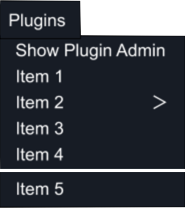
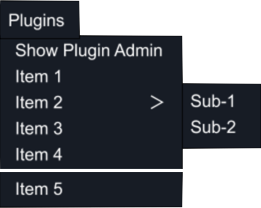
Menus are items which have (or at least, permit) sub-items.
When created (with createMenu()) they will have a
right-arrow (‘>’) displayed. This will be displayed even if
there are no sub-items. In the graphic to the right, we
know all of the items were added with
appendMenuItem() (or appendMenuItemWithCommand()) except Item 2 which
was added using createMenu().
When you create a Menu (i.e., something with ‘>’),
you can create it on the top-level menu
by specifying None for the parentMenu (not findPluginsMenu()).
You’ll get a menuID as a return, and recall that internally
an index is incremented.
The benefit of the menuID is you’ll need it to place menu
items as part of that item’s sub-menu.
Add a regular item as a sub-item using
AppendMenuItem (or AppendMenuItemWithCommand) with the parent menuID.
menuId = xp.createMenu('Item 2', parentMenu=None,
                        parentItem=0,  # value ignored when parentMenu is None
                        callback=handler, refcon=[]
xp.appendMenuItem(menuId, "Sub-1", [])
xp.appendMenuItem(menuId, "Sub-2", [])