Common Installation Errors
On All Platforms
Can't open <folder> to scan for plugins.
- Cause:
XPPython3 looks for its main plugin folder PythonPlugins (See Plugin Installation), and if not found, it will complain. Additionally, XPPython3 will look for aircraft-specific plugins specific to the loaded user aircraft (Global, Aircraft, and Scenery Plugins).
- Solution:
If you were expecting python plugin to be loaded, check to make sure the file(s) are place in the correct location. If you’re not anticipating a plugin to be loaded, ignore the message.
On Mac
You get popup on initial execution:
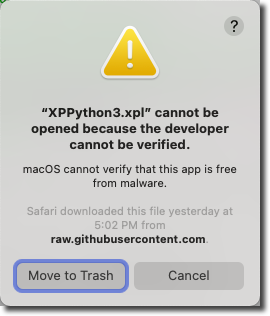
- Cause
The XPPython3 plugin developer (me) cannot be verified, because I’ve not paid Apple $100 / year to get a signature 1. So Apple decides that since it doesn’t know who I am, it cannot check the contents of the plugin, and will therefore not allow it to run without additional action on your part:
- Solution
Press Cancel. If you move it to the trash, you’ll have to download it again…
Follow instructions to remove the quarantine as described in Mac Quarantine.
On Linux
Some distros, apparently, don’t contain one or more of the “other” libraries we require. For example Arch distro (for
one user) didn’t include libbsd shared library. If you don’t see anything in your Log.txt file post installation
of XPPython3, check the linked shared objects and install any that are missing:
$ ldd XPPython3.xpl
    linux-vdso.so.1 (0x00007ffe8d3d)
    libbsd.so.0 => /lib/x86_64-linux-gnu/libbsd.so.0 (0x00007ffed38d)
    libm.so.6 => /lib/x86_64-linux-gnu/libm.so.6 (0x00007fed3f8d)
    libpython3.12.so.1.0 => /lib/x86_64-linux-gnu/libpython3.12.so.1.0 (0x00007fed3f8d)
    libc.so.6 => /lib/x86_64-linux-gnu/libc.so.6 (0x00007fed3f8d)
    libmd.so.0 => /lib/x86_64-linux-gnu/libmd.so.0 (0x00007fed3f8d)
    /lib64/ld-linux-x86-64.so.2 (0x00007fed3f8d)
    libz.so.1 => /lib/x86_64-linux-gnu/libz.so.1 (0x00007fed3f8d)
    libexpat.so.1 => /lib/x86_64-linux-gnu/libexpat.so.1 (0x00007fed3f8d)
On Linux with Steam
If you’re running X-Plane under Steam, on Linux distros, you will probably need to include a special launch option. Steam
alters the way shared libraries are loaded which can cause XPPython3 to fail to properly find some libraries. You’ll most
likely see in the XPPython3Log.txt file something like:
[XPPython3] Version 4.7.0 Started -- Sat May 16 20:39:04 2026
[XPPython3] Python shared library loaded: 'Resources/plugins/XPPython3/lin_x64/python3.12/lib/libpython3.12.so'
[XPPython3] Cryptography package not installed, XPPython3.xpyce will not be supported. See Documentation.
EXCEPTION>> [XPPython3.I_PI_Updater] Traceback (most recent call last):
EXCEPTION>> [XPPython3.I_PI_Updater]
EXCEPTION>> [XPPython3.I_PI_Updater]   File ".local/share/Steam/steamapps/common/X-Plane 12/Resources/plugins/XPPython3/scriptupdate.py", line 15, in <module>
EXCEPTION>> [XPPython3.I_PI_Updater]     from ssl import SSLCertVerificationError  # py 3.7+
EXCEPTION>> [XPPython3.I_PI_Updater]     ^^^^^^^^^^^^^^^^^^^^^^^^^^^^^^^^^^^^^^^^
EXCEPTION>> [XPPython3.I_PI_Updater]   File "python3.12/lib/python3.12/ssl.py", line 100, in <module>
EXCEPTION>> [XPPython3.I_PI_Updater] ImportError: libssl.so.3: cannot open shared object file: No such file or directory
EXCEPTION>> [XPPython3.I_PI_Updater]
EXCEPTION>> [XPPython3.I_PI_Updater] During handling of the above exception, another exception occurred:
EXCEPTION>> [XPPython3.I_PI_Updater]
EXCEPTION>> [XPPython3.I_PI_Updater] Traceback (most recent call last):
EXCEPTION>> [XPPython3.I_PI_Updater]   File ".local/share/Steam/steamapps/common/X-Plane 12/Resources/plugins/XPPython3/I_PI_Updater.py", line 5, in <module>
EXCEPTION>> [XPPython3.I_PI_Updater]     from XPPython3 import scriptupdate
EXCEPTION>> [XPPython3.I_PI_Updater]   File ".local/share/Steam/steamapps/common/X-Plane 12/Resources/plugins/XPPython3/scriptupdate.py", line 17, in <module>
EXCEPTION>> [XPPython3.I_PI_Updater]     from ssl import CertificateError as SSLCertVerificationError  # py < 3.7, py2
EXCEPTION>> [XPPython3.I_PI_Updater]     ^^^^^^^^^^^^^^^^^^^^^^^^^^^^^^^^^^^^^^^^^^^^^^^^^^^^^^^^^^^^
EXCEPTION>> [XPPython3.I_PI_Updater]   File "python3.12/lib/python3.12/ssl.py", line 100, in <module>
EXCEPTION>> [XPPython3.I_PI_Updater] ImportError: libssl.so.3: cannot open shared object file: No such file or directory
[XPPython3] Failed to load pluginInstance for 'XPPython3.I_PI_Updater'
The key bit is “cannot open shared object file: No such file or directory”, while referring to libssl and or libcrypto. Python uses the
standard OS versions of these libraries (usually) found in /usr/lib. Because Steam has altered the load path, the system library is not consulted
so these libraries are not found.
To fix, add an environment variable to the Stream Launch Options:
Right-click X-Plane app in your Stream Library
Select “Properties…” and under “General”, set the Launch Options to the string:
env LD_PRELOAD=/usr/lib/libcrypto.so.3:/usr/lib/libssl.so.3 %command%In this example, make sure the two libraries match your existing file paths, based on your distro. This will forcibly load these two libraries prior to launching X-Plane.
Alternatively, you can alter the LD_LIBRARY_PATH to the system directory, as this will catch any other missing library. (I’ve not tested this, so if you see a better solution, please let me know.):
env LD_LIBRARY_PATH="/usr/lib:$LD_LIBRARY_PATH" %command%
- 1
“Apple signature costs $100/year”. I’m in favor of the quarantine system, but not crazy about having to pay to get a signature as I make no money on XPPython3. If you’d like to donate, I promise to use the first $100 of XPPython3 donations each year to purchase a signature so that others may avoid this hassle. You can donate through Paypal.