Direct Drawing
Basic drawing callbacks are for low level intercepting of render loop. The purpose of drawing callbacks is to provide targeted additions or replacements to x-plane’s graphics environment (for example, to add extra custom objects, or replace drawing of the AI aircraft). Do not assume that the drawing callbacks will be called in the order implied by the enumerations. Also do not assume that each drawing phase ends before another begins; they may be nested.
Note
Laminar says, “Note that all APIs in this section are deprecated, and
will likely be removed during the X-Plane 11 run as part of the
transition to Vulkan/Metal/etc. See XPLMInstance API for
future-proof drawing of 3-D objects.
Register and Unregister your drawing callback(s). You may register a callback multiple times for the same or different phases as long as the reference constant is unique for each registration.
- registerDrawCallback(draw, phase=Phase_Window, after=1, refCon=None)
Register a low level drawing callback.
- Parameters
draw (Callable[[int, int, Any], int]) – Callable to be executed during the drawing phase
phase (int) – Drawing phase constant (default: Phase_Window)
after (int) – 0 to draw before the phase, 1 to draw after (default: 1)
refCon (Any) – Reference constant passed to your callback (default: None)
- Returns
1 on success, 0 otherwise
- Return type
int
Your draw callback function takes three parameters (phase, after, refCon). If after is zero, you callback can return 0 to suppress further X-Plane drawing in the phase, or 1 to allow X-Plane to finish drawing. (Return value is ignored when after is 1.)
You may register a callback multiple times for the same or different phases as long as the refCon is unique for each time.
>>> def MyDraw(phase, after, refCon):
...    xp.setGraphicsState(0, 1, 0, 0, 0, 0, 0)
...    xp.drawString([.9, 0, 0], 110, 175, "Hello there", None, xp.Font_Basic)
...
>>> xp.registerDrawCallback(MyDraw)
1
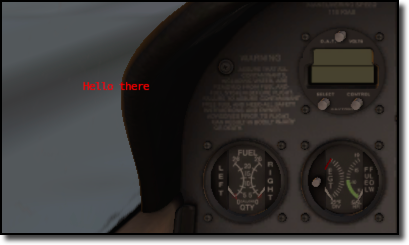
>>> xp.unregisterDrawCallback(MyDraw)
1
If you have installed python opengl:
>>> import OpenGL.GL as GL
>>> def MyGLDraw(phase, after, refCon):
...    xp.setGraphicsState(0, 0, 0, 0, 1, 1, 0)
...    left, top, right, bottom = 100, 200, 200, 100
...    numLines = int(min(top - bottom, right - left) / 2)
...    time = int(numLines * xp.getElapsedTime()) % numLines
...    for i in range(numLines):
...         GL.glBegin(GL.GL_LINE_LOOP)
...         left += 1
...         right -= 1
...         bottom += 1
...         top -= 1
...         x = (i + time) % numLines
...         GL.glColor3f(x / numLines, (numLines - x) / numLines, x / numLines)  # change colors, for fun
...         GL.glVertex2f(left, bottom)
...         GL.glVertex2f(left, top)
...         GL.glVertex2f(right, top)
...         GL.glVertex2f(right, bottom)
...         GL.glEnd()
...
>>> xp.registerDrawCallback(MyGLDraw)
1

>>> xp.unregisterDrawCallback(MyGLDraw)
1
Upon entry to your callback, the OpenGL context will be correctly set up for you and OpenGL will be in ‘local’ coordinates for 3d drawing and panel coordinates for 2d drawing. The OpenGL state (texturing, etc.) will be unknown.
Official SDK XPLMRegisterDrawCallback
Drawing Phases
phase indicates which part of drawing we are in. Drawing is done from the back to the front. We get a callback before or after each item. Metaphases provide access to the beginning and end of the 3d (scene) and 2d (cockpit) drawing in a manner that is independent of new phases added via x-plane implementation.
Warning
As X-Plane’s scenery evolves, some drawing phases may cease to exist and new ones may be invented. If you need a particularly specific use of these codes, consult Austin and/or be prepared to revise your code as X-Plane evolves.
Drawing Phase Value
Meaning
- Phase_Modern3D = 31
A chance to do modern 3D drawing. This is supported under OpenGL and Vulkan.
It is not supported under Metal. It comes with potentially a substantial performance overhead. Please do not opt into this phase if you don’t do any actual drawing that request the depth buffer in some way!
Early indication is that this phase will not be supported in X-Plane 12. You have been warned.
- Official SDK
xplm_Phase_Modern3D
- Phase_FirstCockpit = 35
First phase where you can draw in 2-d.
- Official SDK
xplm_Phase_FirstCockpit
- Phase_Panel = 40
The non-moving parts of the aircraft panel
- Official SDK
xplm_Phase_Panel
- Phase_Gauges = 45
The moving parts of the aircraft panel
- Official SDK
xplm_Phase_Gauges
- Phase_Window = 50
Floating windows from plugins.
- Official SDK
xplm_Phase_Window
- Phase_LastCockpit = 55
Last chance to draw in 2d.
- Official SDK
xplm_Phase_LastCockpit
This may seem obvious, but it bears repeating: Make your draw code fast. It will be executed thousands of times and every microsecond wasted will impact the user’s frame rate (FPS). See, for example, demo code in plugin PI_TextureDraw.py. A simple port from C to Python results in horrid execution times. A benefit of writing in C/C++ is the compiler is able to optimize execution. By changing some simple python code to use python’s
numpymodule, we were able to speed up draw times by a factor of 36 (from 65 milliseconds per frame to 1.8 msec!).
- unregisterDrawCallback(draw, phase=Phase_Window, after=1, refCon=None)
Unregister a low level drawing callback.
- Parameters
draw (Callable[[int, int, Any], int]) – Callable previously registered with registerDrawCallback
phase (int) – Drawing phase constant (default: Phase_Window)
after (int) – 0 for before phase, 1 for after (default: 1)
refCon (Any) – Reference constant used during registration (default: None)
- Returns
1 on success, 0 otherwise
- Return type
int
Parameters must match those provided with
registerDrawCallback(). You must unregister a callback for each time you register, if you have registered it multiple times with different refCons.Official SDK XPLMUnregisterDrawCallback